Product Update
·
·
5 Minutes

For operations teams, keeping independent contractors compliant is a moving target. Drivers swap vehicles, insurance policies change or lapse, documents expire, and unexpected life events can alter a contractor's status overnight. Manually tracking every deadline and expiration date across tens, hundreds, or even thousands of drivers quickly becomes overwhelming, and when one contractor slips through the cracks, the consequences can be serious.
At GigSafe, we understand how difficult continuous compliance can be. If you run operations for a team of ICs, you probably know the routine all too well. Too often, something like this happens:
Urgent drivers get buried. Drivers with expiring documents get lost in a crowded spreadsheet and don't get attention until it's too late.
Drivers get contacted twice. Without a shared record of outreach, team members end up duplicating each other's work, and drivers get repeated messages that make your operation look disorganized.
Nobody knows where things stand. Outreach isn't logged, so contact history and driver status are scattered across your team with no single source of truth.
When outreach depends on a side spreadsheet and a good memory, drivers get lost in the shuffle, and expired documents can take them off the road.
Why We Built Priority Queue
We’ve built up relationships with our incredible customer base over the years, and time and time again, we have consistently heard how challenging it is for teams to easily document and visually track which independent contractors have upcoming document expirations that need attention. They need a way to work through proactive outreach: reminding drivers about upcoming expirations and following up before a deadline passes.
So we built a tool for that job. Priority Queue is a new GigSafe feature that shows every driver whose documents are about to expire, sorted by urgency, and keeps a shared log of every call, text and note your team makes.
Our system still keeps your drivers compliant automatically. Priority Queue just gives your team a hands-on way to stay ahead of upcoming expirations.
You can find Priority Queue under Contractor → Priority Queue in your dashboard.

How Priority Queue Helps Your Team
No driver gets missed. Every driver with expiring documents shows up automatically, with the most urgent at the top. You always know who needs attention first.
No driver gets called twice. Everyone can see who was contacted, when and how, so your team stops doubling up and drivers stop getting repeat calls.
Your team works from one list. A shared record of outreach means you can split the work across the team without stepping on each other.
You can retire the spreadsheet. Everything you were tracking by hand now lives next to the driver record, with nothing to set up or import.
Drivers stay compliant and on the road. Reaching drivers before their documents expire means fewer lapses and less scrambling.
What Priority Queue Does
Priority Queue puts the most urgent drivers at the top of your dashboard.
Every driver with an "Expires Soon" status shows up automatically, sorted so the soonest expiration comes first. It uses the same definition of "soon" as your contractor list, so the two always match. It also respects the market and visibility settings you already have, so your team only sees drivers they're allowed to see.
Each row shows what you need to make the call:
Contractor ID and name
Time until expiration, color-coded the same way as your contractor list
Phone number, right in the row, so you can dial without clicking into anything
Onboarding flow
Last internal contact: how long ago the driver was reached (for example, "3 days ago") and whether it was a call, a text or a note
Priority Queue Remembers Who's Already Been Contacted
Click any driver to open a contact window. You'll see their contact details, which documents are expiring and when, and the most recent outreach: who reached out, how, when, and any notes they left.
After speaking with the driver, you can log the interaction using one of three options:
Called driver: records a call, with an optional note
Texted driver: records a text, with an optional note
Add note: records a free-form internal note
The Last internal contact column updates right away, so your teammates can see the driver has been handled.
It Keeps Your Team Out of Each Other's Way
The Exclude recently contacted filter hides drivers someone reached in the last 3, 7, 14 or 30 days. Anyone who opens the queue sees only the drivers who still need outreach. You can also filter by tags, search, change how many rows show per page, and export the table.
It Keeps a Full History on Every Driver
Every entry you log also shows up in the driver's External Contacts tab on their full contractor record, alongside system events, newest first. For example:
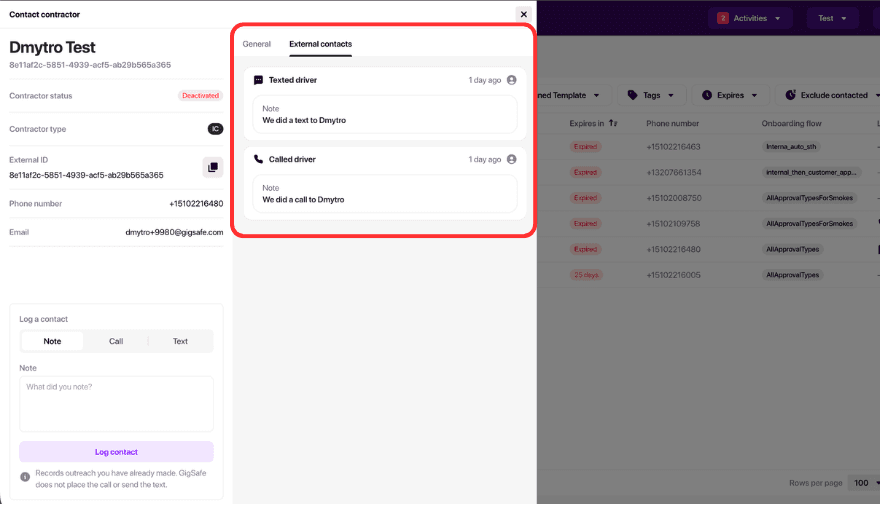
When a driver calls back, anyone on your team can pull up their record and see the full history.
Frequently Asked Questions
What is Priority Queue in GigSafe?
Priority Queue is a worklist of drivers whose documents are about to expire, sorted by urgency. It lets your team log each call, text or note so everyone knows who has been contacted.
How do I get started with Priority Queue?
Go to Contractor → Priority Queue in your dashboard. Start at the top, call or text the driver from your phone, then click the row and log what happened. Turn on Exclude recently contacted so the drivers you've reached drop off your list. Priority Queue comes fully integrated into your dashboard, no setup required.
Does GigSafe Still Maintain our Compliance?
Yes, GigSafe automatically maintains compliance for your organization. Priority Queue adds visibility and offers your team an easier way to view expirations and follow up with drivers directly, too.
Which drivers appear in Priority Queue?
Priority Queue displays all active and inactive drivers marked with the "Expires Soon" status, applying the identical criteria as your contractor list.
Does GigSafe send the texts or make the calls?
No. You reach drivers from your own phone the way you do today, and Priority Queue records that the outreach happened. Of course, the GigSafe Support Team is always here to help you keep your fleet compliant and support outreach.
Can I track outreach with Priority Queue?
Yes. You can log calls and texts for each IC and add notes to every entry. Each note shows which team member logged it, so everyone can see who's handling outreach and what's already been done.
Does Priority Queue replace my contractor list?
No. Your contractor list is still where you manage records. Priority Queue is where you work through outreach. Each driver's contact window links directly to their full contractor record.